Parche Aug 23, 2026

Client v1.1.6

  • New (QoL): New secondary spell bar! Simply drag-and-drop spells to move from one spell bar to the other...

You can create your own spell bar: use it for debuffs, put your auras and cs gems there, whatever you like!

Share your spell bar creation with friends too!

As always, you can disable it in Options>UI if you don't like.

  • New: Main channel is now default to the language you select in the client.

To change the : behavior, right-click the channel you want to make it default.

I'd like to ask politely to use the correct Main - FR channel for french. The official language of the server is english and Main channel should be used only for that.

Players need to close Main channel to stop the french talk they don't understand, staying in total silence(not fun).

It's fixed now and I'm sure it can bring new players to the server!

  • Fix: rare teleport crash.
Parche Aug 21, 2026

Client v1.1.5

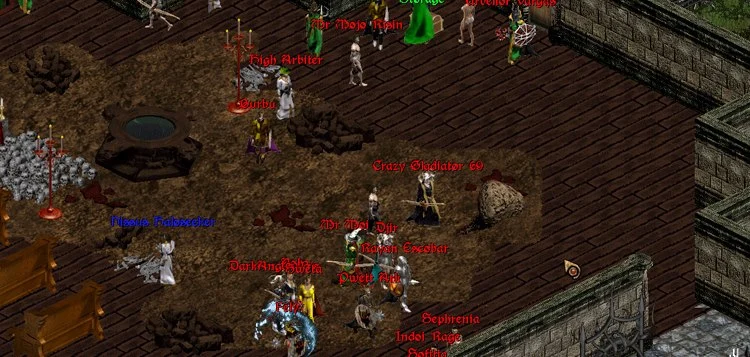
  • New: Added a level display to the right of character's name.

Engage in honored combat, no excuses for ganking anymore!

  • QoL: Added a black border to the font of every text in-game: items, players, monsters and NPC names.

It improves readability of text a lot, specially on smaller screens!
  • QoL: Increased the font size of character names.
Parche Aug 20, 2026

Client v1.1.4

  • New: You can now drag-drop accounts in login screen to reorder them.
  • Fixed: Seraph animation sounds should play normally now.
  • Fixed: When changing characters in-game, character's sex should be changed too.
Parche Aug 17, 2026

Client v1.1.3

  • Fixed: Old bug with double mouse cursor when alt-tabbing or switching windows.
Parche Aug 10, 2026

Client v1.1.2

  • Preparations for the new Honor system.
Parche Aug 9, 2026

Client v1.1.1

  • Teleport code improved(caves etc).
  • Fixed a rare bug that crashed the client while teleporting.
  • Misc. optimization, polishing and bugfixes.
Client v1.1.0
Parche Aug 1, 2026

Client v1.1.0

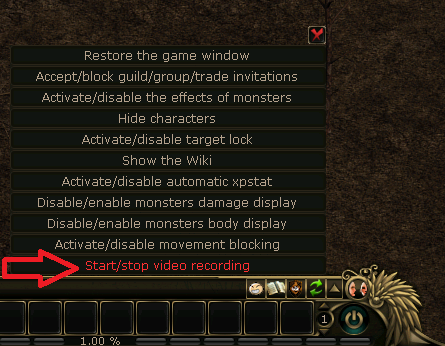
  • New: You can now record your gameplay! Almost zero hit in performance!

Use !rec command or the menu to the right of chatbox to start/stop recording.

  • Login screen updated with buttons for website, screenshots folder and videos folder.
  • Screenshots are now PNG instead of BMP format, with better quality and lower file size.
  • Attack range indicator(Ctrl+Shift+W) is now translucent.
  • Minor bugfix and performance optimization.
Parche Jul 31, 2026

Client v1.0.30

  • New Login screen/Account selector!

You can now see all your saved accounts and characters inside each account. Double-click to connect.

  • Spanish language added.
Parche Jul 29, 2026

Client v1.0.29

  • New: Improved lighting halos graphics.
  • New: Smooth light halos, optional.

You can disable it in Options>Performance

  • Bug: Shadows fixed/updated.
  • Added Italian language to the client.
Parche Jul 26, 2026

Client v1.0.28

  • New: (QoL) You can now Ctrl+click to cast last spell on any portrait or name inside a group window.
  • Small performance improvement while walking.
  • Fixed an old bug with chests in list view. (thanks for reporting @Mugen )
Parche Jul 22, 2026

Client v1.0.27

  • New: Display HP/MP numbers in the Character portrait.

You can disable it in Options>UI.

Parche Jul 20, 2026

Client v1.0.26

  • New: Double-click a monster or player portrait to attack it.

You can also cast spells directly on a portrait.

  • New: Buff group members with spells clicking their name in the group window.
  • Auction House items are now alphabetically ordered.
Parche Jul 19, 2026

BIG UPDATE - Client v1.0.25

  • New: 120 FPS mode!

Enable it in Options>Performance.

  • New: Display MP with mini HP bar!

Enable it in Options>UI.

  • New: Display AC with mini HP bar!

Enable it in Options>UI.

  • Client doesn't ask to run in Administrator mode anymore.
  • When minimized, CPU usage (%) goes to almost zero now.
  • Updated many libraries, removal of unused code.
Parche Jul 15, 2026

Client v1.0.24

  • Map improved: added transparency to fog(black) areas.
  • Added a map transparency slider in game options.
Parche Jul 13, 2026

Client v1.0.23

  • Map movement is now much smoother while walking.
  • Improved performance during map rendering.
  • Fix: Seraph sound is now played when a character or others are logging in.
Server Launch
Evento Jul 11, 2026

Server Launch

Colosseum T4C will have its official launch next Saturday, July 11th, 2026 at 5:00 PM GMT (2:00 PM Brazil / 7:00 PM France).

Parche

Client v1.0.22

  • Fix: Chatbox position now saves the position like the other UI elements.
Parche

Client v1.0.21

  • Additional polish and fixes.
Parche

Client v1.0.20

  • Auto-move improved. Walking diagonally is easier now.
  • Spell range(Ctrl+Shift+W) now updates when applying zoom(mousewheel) to the screen.
Parche

Client v1.0.19

  • Fix for character change feature.
Parche

Client v1.0.18

  • Seamless character change from the game options. Go to options(Ctrl+O), select a different character and press Load.

No need to close the client anymore!

Parche

Client v1.0.17

  • Anti-Bot V2 with improved protection against automation (xp, auto-pot etc).
Parche

Client v1.0.16

  • New option to disable private message sound.
  • Some new client options are now default when you first download it.
Parche

Client v1.0.15

  • You can now disable monster hurt/death sounds(those annoying AH, UH, OH sounds) in Options>Sound.
  • Polishing and removal of more unused code.
Parche

Client v1.0.14

  • Cave/dungeon always dark improvement.
  • Minor performance optimization and removal of unused code.
Parche

Client v1.0.13

  • Fix: TAB map black screen.
  • Fix: Caves/dungeon are now dark at any time of the day.
Parche

Client v1.0.12

  • Security improvements.
Parche

Client v1.0.11

  • You can now enable 64 fps in Options>Performance!
  • More polishing and fixes.
Parche

Client v1.0.10

  • You can now add MOUSEWHEELBUTTON to your macros. It also works with Ctrl or Shift keys.
  • You can now enable Fast Rendering in Options>Performance. (disabled by default)
  • You can now choose upscaling mode to stretch the window or play fullscreen(better image quality).
  • Some fixes and polishing.
Parche

Client v1.0.9

  • No more black bars! Choose the preferred scaling mode in options.
  • New graphic options to improve image quality(graphics).
  • New graphics engine now enabled by default.
Parche

Client v1.0.8

  • New map(TAB) now remembers if it's in full or discovered mode after closing.
  • Mini HP bar is now hidden when TAB map and Chat center is open.
  • Removal of unused/old features from the game options.
  • more changes under the hood.
Parche

Client v1.0.7

  • A few more changes under the hood.
Parche

Client v1.0.6

  • Bugfix.
Parche

Client v1.0.5

  • Darker nights.
  • A few more changes under the hood.
Parche

Client v1.0.4

  • You can now zoom in and out while playing.
Parche

Client v1.0.3

  • More performance optimizations.
Parche

Client v1.0.2

  • NEW MAP FEATURE: Create your own map markers!

Simply right-click anywhere on the map to add your own marker, right-click again to delete it.

  • Many performance optimizations.
  • Time of day desync fixed.
Parche

Client v1.0.1

  • You can now select to manage WASD function with enter key in client options.